🐢 My Verdict
If you play PLO, MonkerSolver is the clear choice — it solves PLO4, PLO8 and NL Hold'em, whereas PioSolver is primarily built for NL Hold'em only. If you play NL exclusively, both are excellent and it really comes down to studying style.
I've spent serious time with both MonkerSolver and PioSolver. For a long time I used Pio heavily when I was grinding NL, and it gave me real insight into GTO play and exploitative adjustments. When I made the switch to PLO, MonkerSolver became my main tool — and it's stayed that way. This article is my honest comparison of both programs based on real use, not marketing material.
What Games Can Each Solver Run?
This is arguably the most important question and the one that will make the decision for most players:
| Game | MonkerSolver | PioSolver |
|---|---|---|
| NL Hold'em | ✓ Yes | ✓ Yes |
| PLO4 | ✓ Yes | ✗ No |
| PLO5 | ✗ No | ✗ No |
| PLO6 | ✗ No | ✗ No |
| PLO8 (Hi/Lo) | ✓ Yes | ✗ No |
| Short Deck | ✗ No | ✗ No |
Locking Ranges and Exploitative Study
One of the most useful features in both solvers is the ability to lock a node and force the solver to find the best response to a non-GTO strategy. This is invaluable for exploitative play — if you know your opponent is somehow deviating from GTO in a specific spot either he is raising/betting to much or too little, or he is calling too muc or too little, you can model that deviation and see what adjustments can be made.
In both solvers you can lock the raise frequency at any node. In Monker it is not as clean as Pio, for example, say the GTO solution suggests raising 10% in a particular spot but you're playing against someone who raises 25% — you lock in 25% and let the solver recalculate the optimal counter-strategy.
This works in both programs, but there's a key difference: in NL Hold'em PioSolver's, you can lock individual hands because. In PLO4 with MonkerSolver, the number of possible hands is vastly larger — so you can only lock percentages rather than specific holdings.
To lock a node in MonkerSolver: open your sim, click the stop button to pause solving, go to the Tree tab, navigate down the action tree to the spot you want, right-click it and select Lock Strategy. You can then type in a custom frequency and re-run the sim to see the exploitative adjustments.
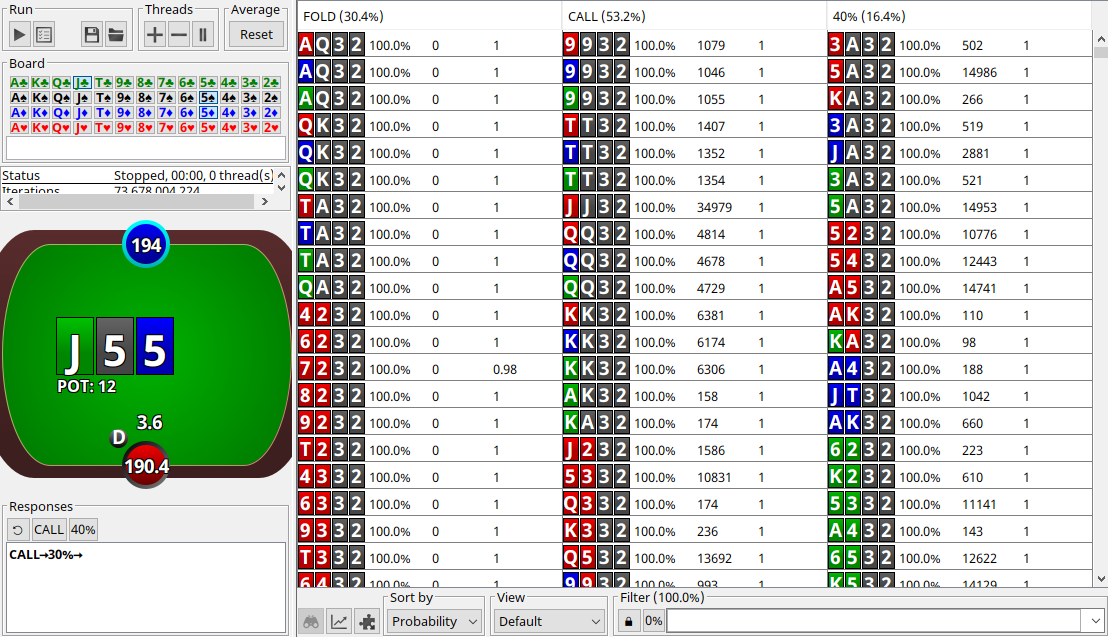
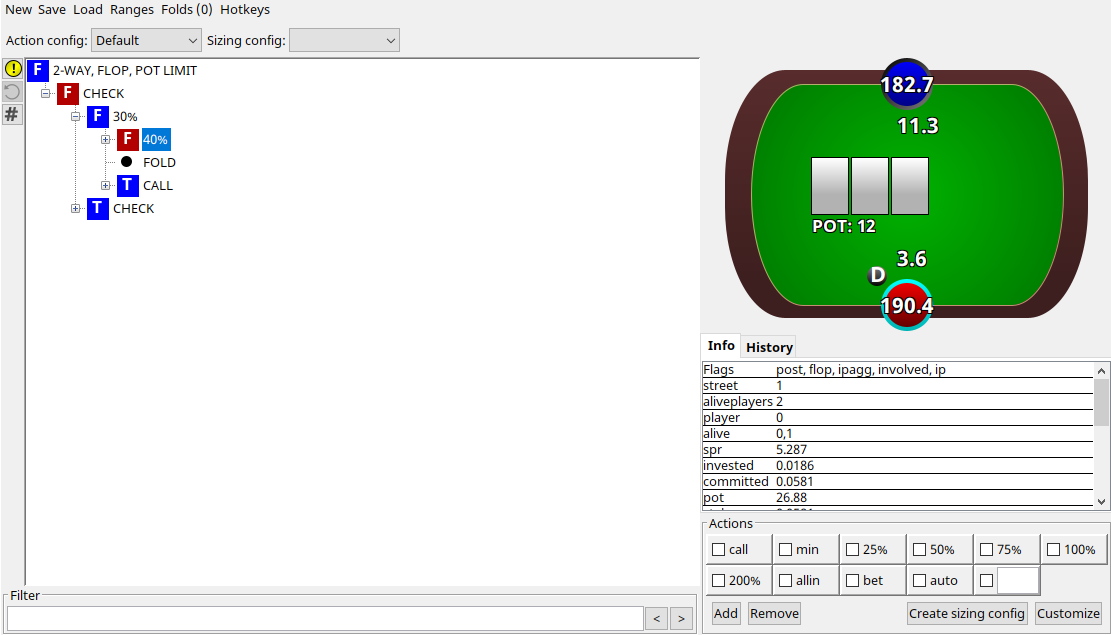
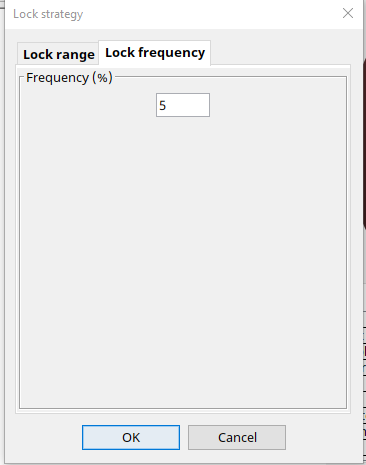
You can possibly do this in MonkerSolver but you will need to make some custom software to get the ranges ready to be imported and as far as I know this is not around right now to purchase.
Interactive Studying: Where MonkerSolver Shines
This is where MonkerSolver pulls ahead for me in terms of day-to-day study. MonkerSolver lets you type in a card or a hand filter and instantly see how it changes the ranges displayed. You can add a card — say you want to see how having the A♠ in your hand changes your strategy — and the range updates in real time. Or you can use the ! operator to exclude a card and see how removing it shifts the distribution. On some boards say, a SRP flush draw board, having a flush draw blocker is a big incentive to bet, which you will learn with MonkerSolver study.
This interactive, filter-based approach to studying is genuinely different from what PioSolver offers. In Pio I found myself looking at outputs — reading the ranges and strategy frequencies — but there was limited interaction. For my learning style, being able to poke at the ranges and immediately see the consequences is far more valuable. That said, I know plenty of strong players who prefer Pio's output-focused approach, so it genuinely depends on how you learn.
MonkerSolver Syntax Reference
One thing that puts people off MonkerSolver initially is the filter syntax. But once you learn it, it becomes second nature — and it's actually very intuitive. Here are the commands I use most often:
| Syntax | Meaning |
|---|---|
| , | OR |
| : | AND |
| ! | NOT (exclude) |
| > | Better than (inclusive) |
| < | Worse than (exclusive) |
| c / h / s / d | Club / Heart / Spade / Diamond |
| xxyy | Double suited |
| xxyw | Single suited |
| xxxy | Triple suited |
| xxxx | Four of a suit (monotone) |
| xywz | Rainbow |
| RR!RROO | One pocket pair exactly |
| !RR | No pocket pairs |
| RROO | Double paired |
| (T,9) | Any hand containing a T or 9 |
| (44-22) | Any hand with a pair of 44, 33 or 22 |
There are more commands beyond these but I've personally never needed them. The learning curve for the syntax is not steep — most people pick it up within a couple of sessions. For a deeper dive into MonkerSolver's features check out our Getting Started with MonkerSolver series.
Hardware Requirements
MonkerSolver
MonkerSolver — Official minimum: Windows 64-bit or Mac OS X with at least 8GB RAM. In practice, for serious PLO solving I'd recommend at least 128GB RAM. The more RAM you have, the larger the trees you can solve. A dedicated solving server is worth considering if you're doing this seriously — a server guide is coming soon.
PioSolver
PioSolver — Official minimum: quad core CPU and 8GB RAM. Because NL Hold'em has far fewer possible hands than PLO, Pio is significantly less RAM-hungry. 64GB is comfortable for most serious NL study.
Price Comparison
MonkerSolver
One-time purchase. Covers NL, PLO4, PLO8 and more.
PioSolver
Pro from ~€450+tax. Edge ~€800+tax. NL focused.
The prices are in a similar bracket. Think of it this way: if you're considering buying a solver, you're already invested enough in poker that you should just buy the right tool for the games you play.
Pros and Cons Summary
| MonkerSolver | PioSolver | |
|---|---|---|
| Games | NL + PLO4/PLO8 + more | NL Hold'em |
| Studying style | Interactive, filter-based | Output-focused |
| Range importing | Requires some setup | More straightforward |
| Node locking | Percentage-based for PLO | Hand-specific for NL |
| Hardware demand | Very high (PLO complexity) | Moderate |
| Learning curve | Moderate (syntax to learn) | Gentler initially |
| Price | €499 | €450–800+tax |
Which Should You Buy?
Buy MonkerSolver if: you play any form of PLO, you play multiple game types, or you prefer an interactive studying style where you explore ranges dynamically.
Buy PioSolver if: you play NL Hold'em exclusively and prefer studying pre-generated outputs and reading frequencies in a more structured way.
Personally, MonkerSolver is my recommendation. The interactive range exploration suits my learning style, it solves every major game variant I play, and the syntax — while it takes a session or two to get comfortable with — opens up a very powerful way of studying ranges.
If you're unsure, watch some YouTube videos of each and see which style resonates. If you have specific questions about MonkerSolver, check out our Getting Started with MonkerSolver series or feel free to reach out at support@plodalong.com.
For full specs, costs and setup guidance, see our MonkerSolver Server Guide.